NumPy Notes
This is the note for article A Visual Intro to NumPy and Data Representation, by Jay Alammar
Chinese version can be found at Numpy和数据展示的可视化介绍
Also, it takes some notes for another article NumPy Illustrated: The Visual Guide to NumPy, and the a Chinese version of it can be found at 图解 | NumPy可视化指南, another version is at 一图胜千言,超形象图解NumPy教程!
NumPy Illustrated: The Visual Guide to NumPy
1. Vectors, the 1D Arrays
初始化Numpy array用到的函数
| 函数 | 参数 |
|---|---|
np.array(pylist) |
使用Python list来初始化一个Numpy array |
np.zeros() |
shape, dtype=float, order='C' |
np.ones() |
shape, dtype=None, order='C' |
np.empty() |
shape, dtype=float, order='C' |
np.full() |
shape, fill_value, dtype=None, order='C' |
np.zeros_like() |
a, dtype=None, order='K', subok=True, shape=None |
np.ones_like() |
a, dtype=None, order='K', subok=True, shape=None |
np.empty_like() |
prototype, dtype=None, order='K', subok=True, shape=None |
np.full_like() |
a, fill_value, dtype=None, order='K', subok=True, shape=None |
使用单调序列初始化Numpy array
| 函数 | 参数 |
|---|---|
np.arange() |
[start,] stop[, step,], dtype=None |
np.linspace() |
start, stop, num=50, endpoint=True, retstep=False, dtype=None, axis=0 |
创建随机数组
旧式创建方法(deprecated)
| 函数 | 参数 |
|---|---|
np.random.randint |
low, high=None, size=None, dtype=int |
np.random.rand |
d0, d1, ..., dn |
np.random.uniform |
low=0.0, high=1.0, size=None |
新式创建方法
首先创建对象:rng = np.random.default_rng()
| 函数 | 参数 |
|---|---|
rng.integers |
low, high=None, size=None, dtype=np.int64, endpoint=False |
rng.random |
size=None, dtype=np.float64, out=None |
rng.uniform |
low=0.0, high=1.0, size=None |
2. Vector indexing
基本索引操作
可以指定单个索引,索引范围,反向索引,以及数组索引
定义1D array(一维数组)
>>> a = np.arange(1, 6)
>>> a
array([1, 2, 3, 4, 5])
操作及效果
| 索引操作 | 结果 | 效果 |
|---|---|---|
a[1] |
2 |
返回view |
a[2:4] |
array([3, 4]) |
返回view |
a[-2:] |
array([4, 5]) |
返回view |
a[::2] |
array([1, 3, 5]) |
返回view |
a[[1,3,4]] |
array([2, 4, 5]) |
fancy indexing,返回新数组 |
定义2D array(二维数组)
a = np.array([[3, 4, 5, 6], [2, 7, 0, -1], [1, 5, 3, 18], [2, 6, 1989, 3]])
>>> a
array([[   3,    4,    5,    6],
       [   2,    7,    0,   -1],
       [   1,    5,    3,   18],
       [   2,    6, 1989,    3]])
操作及效果
| 索引操作 | 结果 | 效果 |
|---|---|---|
a[1] |
array([2,7,0,-1]) |
返回第1行 |
a[2:4] |
array([[1,5,3,18],[2,6,1989,3]]) |
返回第2到4行 |
a[-2:] |
array([1,5,3,18]) |
返回倒数第一行 |
a[::2] |
array([[3,4,5,6],[1,5,3,18]]) |
返回第0和2行 |
a[[0,1,3]] |
array([[3,4,5,6],[2,7,0,-1],[2,6,1989,3]]) |
fancy indexing,返回新数组,第0、1和3行 |
a[:,[1,3]] |
array([[4,6], [7,-1], [5,18], [6,3] ]]) |
fancy indexing,返回新数组,第1和3列 |
Python list vs Numpy list
| Python List | Numpy List |
|---|---|
a = [1, 2, 3] |
a = np.array([1, 2, 3]) |
b = a (no copy) |
b = a (no copy) |
c = a[:] (copy) |
c = a[:] (no copy) |
d = a.copy() (copy) |
d = a.copy() (copy) |
Boolean索引
定义数组:a = np.array([1, 2, 3, 4, 5, 6, 7, 6, 5, 4, 3, 2, 1])
逻辑比较(返回一个Boolean数组)
>>> a > 5
array([False, False, False, False, False,  True,  True,  True, False,
       False, False, False, False])
any和all函数
>>> np.any(a > 5)
True

>>> np.all(a > 5)
False
利用Boolean数组索引
>>> a[a > 5]
array([6, 7, 6])

>>> a[(a >= 3) & (a <= 5)]
array([3, 4, 5, 5, 4, 3])
np.where和np.clip函数
| 函数 | 参数 | 作用 |
|---|---|---|
np.where() |
condition, [x, y]condition: array_like, bool |
If condition is true, yield x, otherwise yield y.If x or y 都没有指定,返回原先数组中的值 |
np.clip() |
a, a_min, a_max, out=None, **kwargs |
指定值的范围[a_min, a_max],小于 a_min的赋值为a_min,大于a_max的赋值a_max |
3. Vector operations
基本操作:vector之间的加减乘除整除
# 定义两个数组
>>> a = np.array([4, 8])
>>> b = np.array([2, 5])
# 加
>>> a + b
array([ 6, 13])
# 减
>>> a - b
array([2, 3])
# 乘
>>> a * b
array([ 8, 40])
# 除
>>> a / b
array([2. , 1.6])
# 整除
>>> a // b
array([2, 1], dtype=int32)
# 乘方
>>> a ** b
array([   16, 32768], dtype=int32)
基本操作:vector与scalar之间的加减乘除整除
# 定义数组
>>> c = np.array([1, 2])
# 加
>>> c + 3
array([4, 5])
# 减
>>> c - 3
array([-2, -1])
# 乘
>>> c * 3
array([3, 6])
# 除
>>> c / 3
array([0.33333333, 0.66666667])
# 整除
>>> c // 2
array([0, 1], dtype=int32)
# 乘方
>>> c ** 2
array([1, 4], dtype=int32)
截断近似函数
np.floor向下取整(round to negative infinity, -\(\infty\))
>>> np.floor([1.1, 1.5, 1.9, 2.5])
array([1., 1., 1., 2.])
np.ceil向上取整(round to negative infinity, +\(\infty\))
>>> np.ceil([1.1, 1.5, 1.9, 2.5])
array([2., 2., 2., 3.])
np.round向最近的整数截断(around to nearest integer)
>>> np.round([1.1, 1.5, 1.9, 2.5])
array([1., 2., 2., 2.])
一些数学函数
# 开方
>>> np.sqrt([4, 9])
array([2., 3.])
# 以e为底的幂乘
>>> np.exp([1, 2])
array([2.71828183, 7.3890561 ])
# 以e为底的对数(the logrithm of np.e to base e)
>>> np.log([np.e, np.e**2])
array([1., 2.])
# 点积
>>> np.dot([1,2], [3,4])
11
# 点积的另一种写法
>>> np.array([1,2]) @ np.array([3,4])
11
# 叉积
>>> np.cross([2, 0, 0], [0, 3, 0])
array([0, 0, 6])
# 正弦
>>> np.sin([np.pi, np.pi/2])
array([1.2246468e-16, 1.0000000e+00])
# 反正弦
>>> np.arcsin([0, 1])
array([0.        , 1.57079633])
# 平方和的开方
>>> np.hypot([3,5], [4,12])
array([ 5., 13.])
一些三角函数
| 三角函数 | 反三角函数 | 双曲函数 | 反双曲函数 |
|---|---|---|---|
sin |
arcsin |
sinh |
arcsinh |
cos |
arccos |
cosh |
arccosh |
tan |
arctan |
tanh |
arctanh |
双曲正弦函数:\(\sinh{x}\)
双曲余弦函数:\(\cosh{x}\)
双曲正切函数:\(\tanh{x}\)
基本的统计函数
# 最大值
>>> np.max([1, 2, 3])
3
# 最大值
>>> np.array([1, 2, 3]).max()
3
# 最大值的索引
>>> np.array([1, 2, 3]).argmax()
2
# 最小值
>>> np.array([1, 2, 3]).min()
1
# 最小值的索引
>>> np.array([1, 2, 3]).argmin()
0
# 求和
>>> np.array([1, 2, 3]).sum()
6
# 求平均
>>> np.array([1, 2, 3]).mean()
2.0
# 标准差
>>> np.array([1, 2, 3]).var()
0.6666666666666666
# 方差
>>> np.array([1, 2, 3]).std()
0.816496580927726
排序函数
| Python List | Numpy Arrays | Effect |
|---|---|---|
a.sort() |
a.sort() |
sort in place |
sorted(a) |
np.sort(a) |
return a new sorted array |
a.sort(key=f) |
- | sort with key |
a.sort(reversed=False) |
- | ascending/descending order |
4. Searching for an element in a vector
Python list search - index method
Python list有index方法,而Numpy没有
a.index(x [, i [, j]])
这里x是要查找的元素,i和j分别是指定区间的上下限,如果没有找到,会raise exception
>>> a = [12, 0, -1, 78, 99]
>>> a.index(78)
3
>>> a.index(78, 4)
Traceback (most recent call last):
  File "<pyshell#6>", line 1, in <module>
    a.index(78, 4)
ValueError: 78 is not in list
Numpy list search
Numpy中有三种办法查找某个元素
np.where
>>> a = [12, 0, -1, 78, 99]
>>> np.where(a == 78)[0][0]
3
next + np.ndenumerate(这种需要Numba来加速,否则就和上面的np.where一样,比较慢)
>>> a = [12, 0, -1, 78, 99]
>>> next(i[0] for i, v in np.ndenumerate(a) if v == 78)
3
np.searchsorted
>>> a = [12, 0, -1, 78, 99]
>>> b = np.sort(a)
>>> b
array([-1,  0, 12, 78, 99])
>>> np.searchsorted(b, 78)
3
5. Comparing floats
np.allclose(a, b)用于容忍误差之内的浮点比较
but, there is no silver bullet!
| 表达式 | 结果 |
|---|---|
0.1 + 0.2 == 0.3 |
False |
np.allclose(0.1 + 0.2, 0.3) |
True |
math.isclose(0.1 + 0.2, 0.3) |
True |
| 表达式 | 结果 |
|---|---|
1e-9 == 2e-9 |
False |
np.allclose(1e-9, 2e-9) |
True |
math.isclose(1e-9, 2e-9) |
False |
| 表达式 | 结果 |
|---|---|
0.1 + 0.2 - 0.3 == 0 |
True |
np.allclose(0.1 + 0.2 - 0.3, 0) |
True |
math.isclose(0.1 + 0.2 - 0.3, 0) |
False |
注意
np.allclose假定所有比较数字的尺度为1。比如,如果在纳秒级别上,则需要将默认
atol参数除以1e9:np.allclose(1e-9,2e-9, atol=1e-17)==False。math.isclose不对要比较的数字做任何假设,而是需要用户提供一个合理的abs_tol值(np.allclose默认的atol值为1e-8)一些问题见如下链接
NumPy issue on GitHub.
6. Matrices, the 2D Array
基本概念
现在在Numpy中,matrix 和 2D Array 是指同一个概念,可以相互替换使用(interchangeably)
在Numpy中,原先的class
matrix已经不再使用(deprecated)
定义一个Numpy 2D array:a = np.array([[1, 2, 3], [4, 5, 6]])
它的
.shape属性返回一个元组,共有两个元素,第一个是行数,第二个是列数len(a)返回的是2D array的行数
>>> a = np.array([[1, 2, 3], [4, 5, 6]])
>>> a.dtype
dtype('int32')
>>> a.shape
(2, 3)
>>> len(a)
2
>>> a.shape[0]
2
常用函数
之前的zeros,ones,full,empty还有eye都可以用来生成2D array
需要注意的是,指定2D array的元组要用括号()括起来,表示第一个参数,因为第二个参数是留给dtype的
>>> np.zeros((3, 2))
array([[0., 0.],
       [0., 0.],
       [0., 0.]])
>>> np.ones((3, 2))
array([[1., 1.],
       [1., 1.],
       [1., 1.]])
>>> np.full((3, 2), 7)
array([[7, 7],
       [7, 7],
       [7, 7]])
>>> np.empty((3, 2))
array([[1., 1.],
       [1., 1.],
       [1., 1.]])
>>> np.eye(3, 3)
array([[1., 0., 0.],
       [0., 1., 0.],
       [0., 0., 1.]])
>>> np.eye(3)
array([[1., 0., 0.],
       [0., 1., 0.],
       [0., 0., 1.]])
还有random函数
# x服从[0, 10)上的均匀分布(整数)
>>> np.random.randint(0, 10, [3, 2])
array([[7, 1],
       [6, 6],
       [2, 1]])
# x服从[0, 1)上的均匀分布
>>> np.random.rand(3, 2)
array([[0.1518058 , 0.47967987],
       [0.0242219 , 0.46161326],
       [0.64206284, 0.02072145]])
# x服从[0, 1)上的均匀分布(浮点数)
>>> np.random.uniform(1, 10, [3, 2])
array([[4.60676287, 4.64315581],
       [9.56576352, 2.2958745 ],
       [2.18304639, 5.9622002 ]])
np.random.randn,x服从标准正态分布,\( N(\mu, \sigma^2), \mu = 0, \sigma = 1 \)
# x服从标准正态分布
>>> np.random.randn(3, 2)
array([[-0.95367737, -0.35999719],
       [-0.27186541,  1.10111502],
       [-0.36303053,  0.5372727 ]])
np.random.normal,x服从正态分布,\( N(\mu, \sigma^2), \mu = 10, \sigma = 2 \)
# x服从正态分布
>>> np.random.normal(10, 2, [3, 2])
array([[10.06207497,  9.45178632],
       [ 9.02901148, 10.92862084],
       [12.53682855, 10.20647998]])
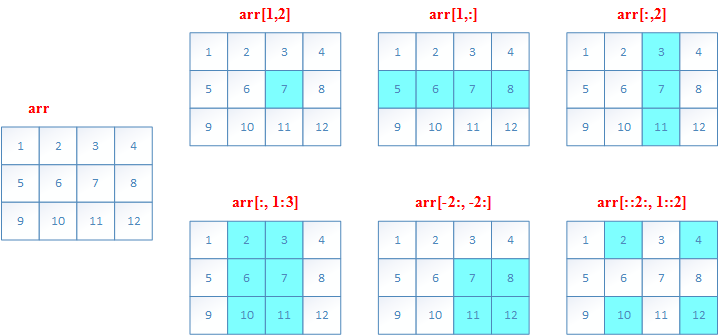
二维数组的索引(切片slice)
和一维数组的slice类似例子如下
>>> a = np.array([[1,2,3,4], [5,6,7,8], [9,10,11,12]])
>>> a[1,2]
7
>>> a[1,:]
array([5, 6, 7, 8])
>>> a[:,2]
array([ 3,  7, 11])
>>> a[:,1:3]
array([[ 2,  3],
       [ 6,  7],
       [10, 11]])
>>> a[-2:,-2:]
array([[ 7,  8],
       [11, 12]])
>>> a[::2, 1::2]
array([[ 2,  4],
       [10, 12]])
7. The axis argument
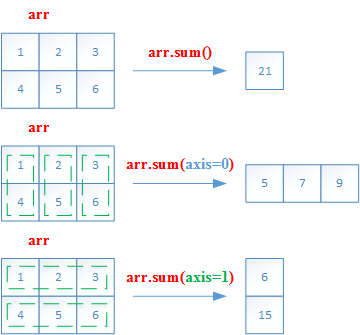
轴参数(axis argument)
Numpy引入
axis参数,以便实现跨行或跨列操作axis参数的值实际上是维度数量。(第一维axis=0,第二维axis=1,以此类推)二维数组中,
axis=0表示列方向,axis=1表示行方向
| ##axis | 方向 |
|---|---|
axis = 0 |
列方向(即所有行) |
axis = 1 |
行方向(即所有列) |
以sum为例子
>>> a = np.array([[1,2,3], [4, 5,6]])
>>> a.sum()
21
>>> a.sum(axis=0)
array([5, 7, 9])
>>> a.sum(axis=1)
array([ 6, 15])
矩阵的算术运算
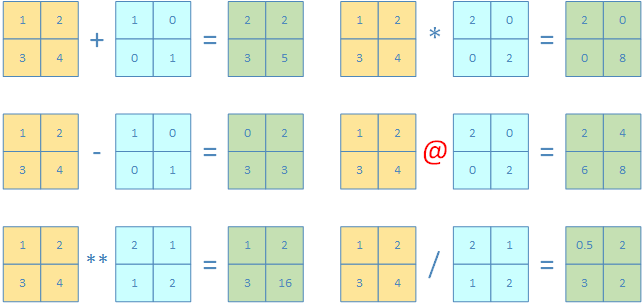
2D Array支持数组逐个元素之间的运算:
+,-,*,/,//,**2D Array也支持外积(outer product)
>>> np.array([[1,2],[3,4]]) + np.array([[1,0],[0,1]])
array([[2, 2],
       [3, 5]])
>>> np.array([[1,2],[3,4]]) - np.array([[1,0],[0,1]])
array([[0, 2],
       [3, 3]])
>>> np.array([[1,2],[3,4]]) ** np.array([[2,1],[1,2]])
array([[ 1,  2],
       [ 3, 16]], dtype=int32)
>>> np.array([[1,2],[3,4]]) * np.array([[2,0],[0,2]])
array([[2, 0],
       [0, 8]])
>>> np.array([[1,2],[3,4]]) @ np.array([[2,0],[0,2]])
array([[2, 4],
       [6, 8]])
>>> np.array([[1,2],[3,4]]) / np.array([[2,1],[1,2]])
array([[0.5, 2. ],
       [3. , 2. ]])
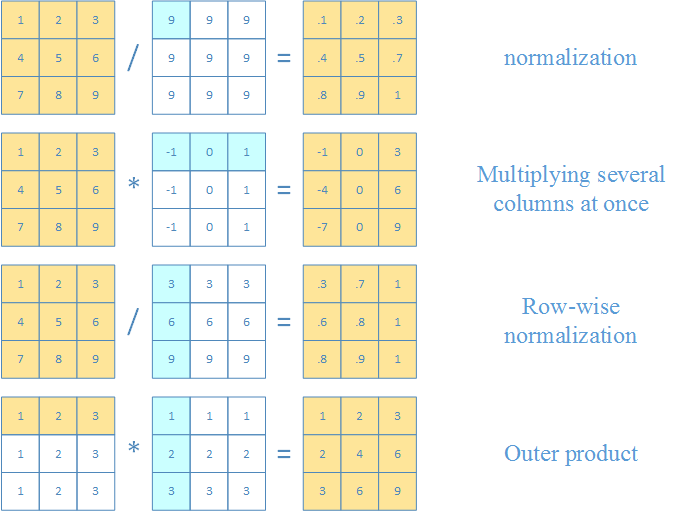
Numpy通过标量的广播机制(broadcasting from scalar),可以实现以下混合运算
向量和矩阵之间
两个向量之间
>>> a = np.array([[1,2,3], [4, 5,6], [7,8,9]])
>>> a / 9
array([[0.11111111, 0.22222222, 0.33333333],
       [0.44444444, 0.55555556, 0.66666667],
       [0.77777778, 0.88888889, 1.        ]])
>>> a * np.array([-1, 0, 1])
array([[-1,  0,  3],
       [-4,  0,  6],
       [-7,  0,  9]])
>>> a / np.array([[3],[6],[9]])
array([[0.33333333, 0.66666667, 1.        ],
       [0.66666667, 0.83333333, 1.        ],
       [0.77777778, 0.88888889, 1.        ]])
>>> np.array([1, 2, 3]) * np.array([[1], [2], [3]])
array([[1, 2, 3],
       [2, 4, 6],
       [3, 6, 9]])
点积和叉积(内积和外积)
>>> np.array([[1],[2],[3]]) @ np.array([[1,2,3]])
array([[1, 2, 3],
       [2, 4, 6],
       [3, 6, 9]])

>>> np.array([1,2,3]) @ np.array([[1],[2],[3]])
array([14])
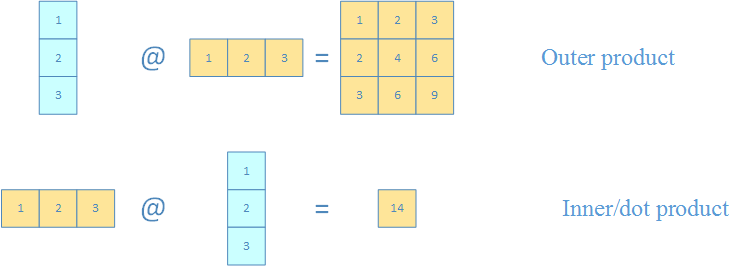
8. Row vectors & column vectors
Numpy中共有三种类型的向量
| 向量类型 | vector types |
|---|---|
| 1维数组 | 1D arrays |
| 2维行向量 | 2D row vectors |
| 2维列向量 | 2D column vectors |
三种类型的vector相互之间的转换如下
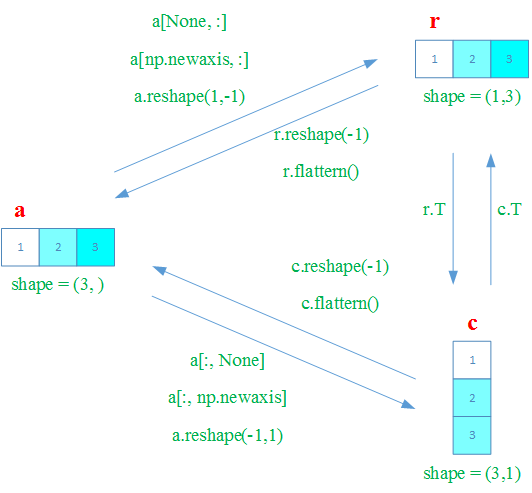
除了一维数组外,所有的数组大小(
shape属性)都是一个向量比如
a.shape == [1, 1, 1, 5, 1, 1]一维数组的大小(
shape属性)是(N, )的形式
在Numpy中,一维数组默认是行向量(row vector)
注意:Numpy中,一个行向量和只有一个行向量的矩阵是不同的
一个行向量的
shape属性是(n, )需要注意的是一个行向量的转置(transpose)仍然是行向量。
>>> c = np.array([1, 2, 3])
>>> c.shape
(3,)
>>> c.T
array([1, 2, 3])
只有一个行向量的矩阵的
shape属性是(1, n)只有一个行向量的矩阵的转置(transpose)是只有一个列向量的矩阵。
>>> b = np.array([[1,2,3]])
>>> b.shape
(1, 3)
>>> b.T
array([[1],
       [2],
       [3]])
可以通过
reshape把一个行向量转换为一个列向量矩阵或行向量矩阵假定现有一个行向量
a如下>>> a = np.array([1, 2, 3, 4, 5, 6]) >>> a.shape (6,)
转换为列向量矩阵。这里
reshape的第一个参数-1表示该维度(第一个维度)上自动推断决定>>> b = a.reshape(-1, 1) >>> b array([[1], [2], [3], [4], [5], [6]]) >>> b.shape (6, 1)
转换为行向量矩阵。这里
reshape的第二个参数-1表示该维度(第二个维度)上自动推断决定>>> c = a.reshape(1, -1) >>> c array([[1, 2, 3, 4, 5, 6]]) >>> c.shape (1, 6)
类似的,也可以使用
np.newaxis来转换上面的行向量同样的,假定现有一个行向量
a如下>>> a = np.array([1, 2, 3, 4, 5, 6]) >>> a.shape (6,)
转换为列向量矩阵。
这里
a[:, None]中的None相当于np.newaxis>>> b = a[:, None] # 这里可以用np.newaxis替换None >>> b array([[1], [2], [3], [4], [5], [6]]) >>> b.shape (6, 1)
转换为行向量矩阵。
>>> c = a[None, :]
>>> c
array([[1, 2, 3, 4, 5, 6]])
>>> c.shape
(1, 6)
9. Matrix manipulations
主要的函数
| 函数 | 作用 |
|---|---|
np.hstack |
横向拼接 |
np.vstatck |
纵向拼接 |
np.column_statck |
用于2D和1D array横向拼接 |
np.hsplit |
横向切割(沿y轴切割) |
np.vsplit |
纵向切割(沿x轴切割) |
np.tile |
2D array整体重复 |
ndarray.repeat |
元素重复 |
np.delete |
删除行或列 |
np.insert |
插入行或列 |
np.append |
可以同时实现np.hstack和np.vstack的作用 |
np.pad |
在矩阵四周添加指定行数或列数的元素 |
拼接和分割函数
| 拼接函数 | 分割函数 |
|---|---|
np.hstack |
np.hsplit |
np.vstatck |
np.vsplit |
np.column_statck |
Numpy中的拼接函数
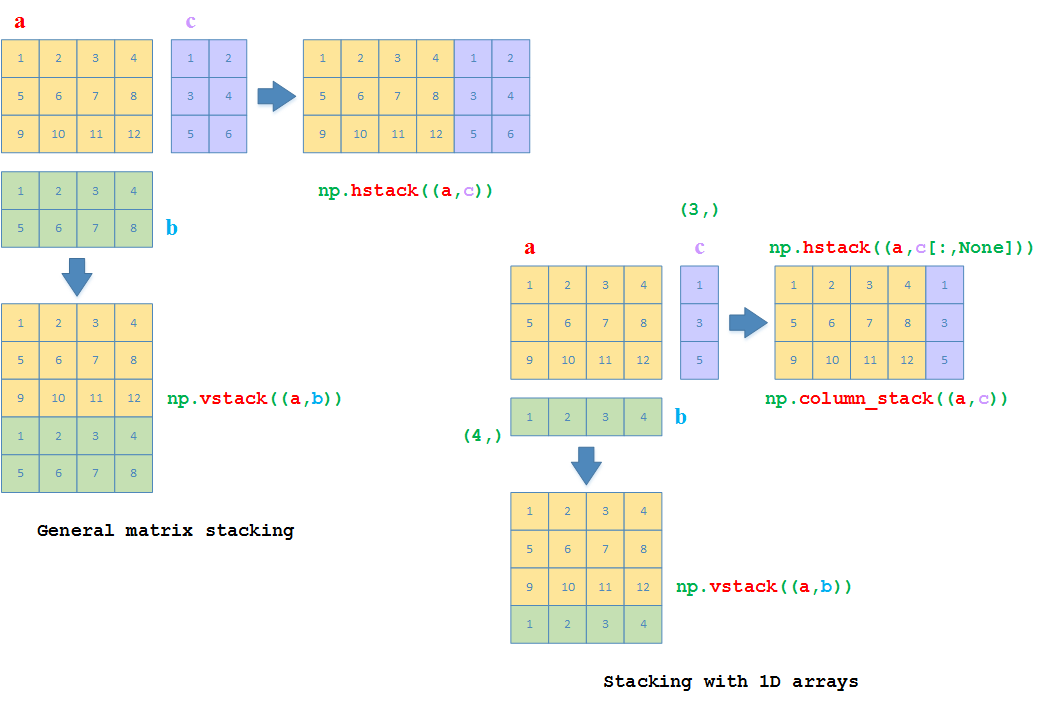
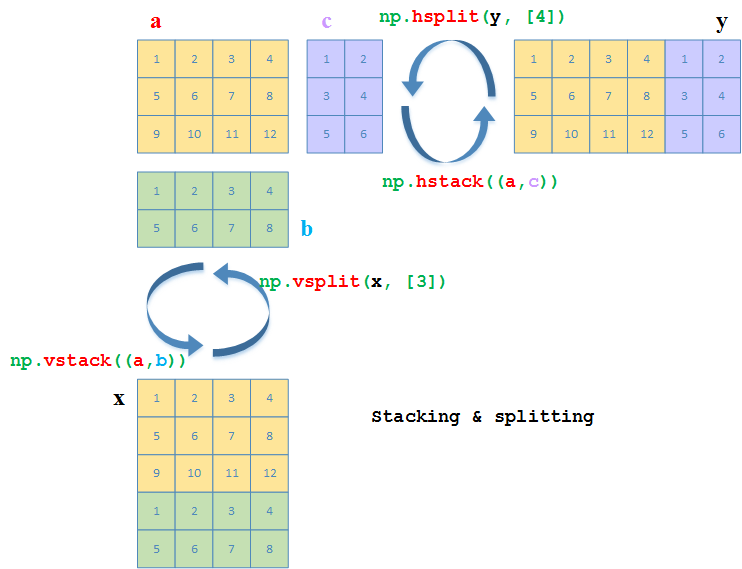
np.hstack:横向拼接np.vstatck:纵向拼接np.column_stack:用于2D array和1D array的横向拼接>>> a = np.array([[1,2,3,4], [5,6,7,8], [9,10,11,12]]) >>> b = np.array([[1,2,3,4], [5,6,7,8]]) >>> c = np.array([[1,2], [3,4], [5,6]]) # 纵向拼接 >>> np.vstack((a, b)) array([[ 1, 2, 3, 4], [ 5, 6, 7, 8], [ 9, 10, 11, 12], [ 1, 2, 3, 4], [ 5, 6, 7, 8]]) # 横向拼接 >>> np.hstack((a, c)) array([[ 1, 2, 3, 4, 1, 2], [ 5, 6, 7, 8, 3, 4], [ 9, 10, 11, 12, 5, 6]]) # b和c现重新改为1D array >>> b = np.array([1,2,3,4]) # 2D array和1D array可以直接做纵向拼接 >>> np.vstack((a, b)) array([[ 1, 2, 3, 4], [ 5, 6, 7, 8], [ 9, 10, 11, 12], [ 1, 2, 3, 4]]) >>> c = np.array([1,3,5]) # 2D array和1D array直接做横向拼接会抛异常 >>> np.hstack((a, c)) Traceback (most recent call last): File "<pyshell#10>", line 1, in <module> np.hstack((a, c)) File "<__array_function__ internals>", line 6, in hstack File "C:\Python36\lib\site-packages\numpy\core\shape_base.py", line 346, in hstack return _nx.concatenate(arrs, 1) File "<__array_function__ internals>", line 6, in concatenate ValueError: all the input arrays must have same number of dimensions, but the array at index 0 has 2 dimension(s) and the array at index 1 has 1 dimension(s) # 2D array和转换为行向量的1D array再直接做横向拼接 >>> np.hstack((a, c[:,None])) array([[ 1, 2, 3, 4, 1], [ 5, 6, 7, 8, 3], [ 9, 10, 11, 12, 5]]) # 或者直接利用np.column_stack来直接拼接2D array和1D array >>> np.column_stack((a, c)) array([[ 1, 2, 3, 4, 1], [ 5, 6, 7, 8, 3], [ 9, 10, 11, 12, 5]])
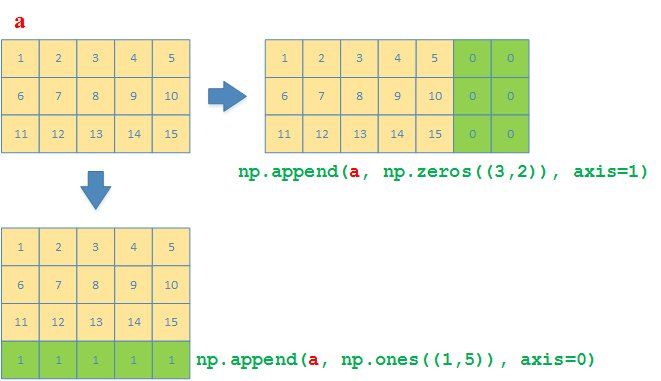
np.append函数可以同时实现np.vstack和np.hstack的效果>>> a = np.array([[1,2,3,4,5], [6,7,8,9,10], [11,12,13,14,15]]) # 沿着y方向(列的方向),在矩阵最后添加一行,值都是1 >>> np.append(a, np.ones((1,5)), axis=0) array([[ 1., 2., 3., 4., 5.], [ 6., 7., 8., 9., 10.], [11., 12., 13., 14., 15.], [ 1., 1., 1., 1., 1.]]) # 沿着x方向(行的方向),在矩阵最后添加一个3x2的矩阵,值都是0 >>> np.append(a, np.zeros((3,2)), axis=1) array([[ 1., 2., 3., 4., 5., 0., 0.], [ 6., 7., 8., 9., 10., 0., 0.], [11., 12., 13., 14., 15., 0., 0.]])
Numpy中的分割函数
和np.vstack以及np.hstack相对应的,有分割函数
np.vsplit:沿着x轴(axis=0)进行分割(纵向分割)第二个参数是行的索引(数组),表示从第几行起开始分割
返回一个list,某个元素是分割后的数组
np.hsplit:沿着y轴(axis=1)进行分割(横向分割)第二个参数是列的索引(数组),表示从第几列起开始分割
返回一个list,某个元素是分割后的数组
# 纵向分割
>>> a = np.array([[1,2,3,4], [5,6,7,8], [9,10,11,12]])
>>> b = np.array([[1,2,3,4], [5,6,7,8]])
>>> x = np.vstack((a, b))
>>> np.vsplit(x, [3]) # 第二个参数是行的索引,表示从第几行起开始分割
[array([[ 1,  2,  3,  4],
       [ 5,  6,  7,  8],
       [ 9, 10, 11, 12]]),
 array([[1, 2, 3, 4],
       [5, 6, 7, 8]])]
# 横向分割
>>> a = np.array([[1,2,3,4], [5,6,7,8], [9,10,11,12]])
>>> c = np.array([[1,2], [3,4], [5,6]])
>>> y = np.hstack((a, c))
>>> np.hsplit(y, [4])  # 第二个参数是列的索引,表示从第几列起开始分割
[array([[ 1,  2,  3,  4],
       [ 5,  6,  7,  8],
       [ 9, 10, 11, 12]]),
 array([[1, 2],
       [3, 4],
       [5, 6]])]
矩阵的复制
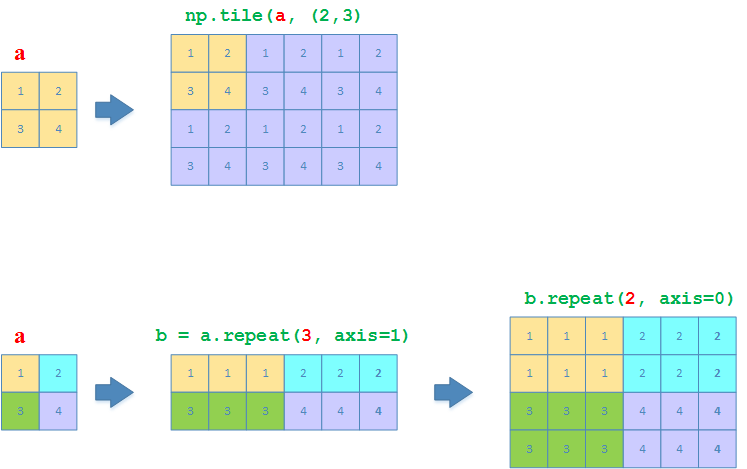
np.tile:like copy-pasting相当于把整个矩阵当做一个整体,然后以该整体为单位进行复制
np.repeat:like collated printing相当于对矩阵里面的每个元素,按照
axist=0(列方向)或axis=1(行方向)的方式依次进行重复
>>> a = np.array([[1,2], [3,4]])
>>> np.tile(a, (2, 3))
array([[1, 2, 1, 2, 1, 2],
       [3, 4, 3, 4, 3, 4],
       [1, 2, 1, 2, 1, 2],
       [3, 4, 3, 4, 3, 4]])
>>> a.repeat(3, axis=1)
array([[1, 1, 1, 2, 2, 2],
       [3, 3, 3, 4, 4, 4]])
>>> a.repeat(3, axis=1).repeat(2, axis=0)
array([[1, 1, 1, 2, 2, 2],
       [1, 1, 1, 2, 2, 2],
       [3, 3, 3, 4, 4, 4],
       [3, 3, 3, 4, 4, 4]])
矩阵行和列的删除与插入
删除与插入函数
| 删除 | 插入 |
|---|---|
np.delete |
np.insert |
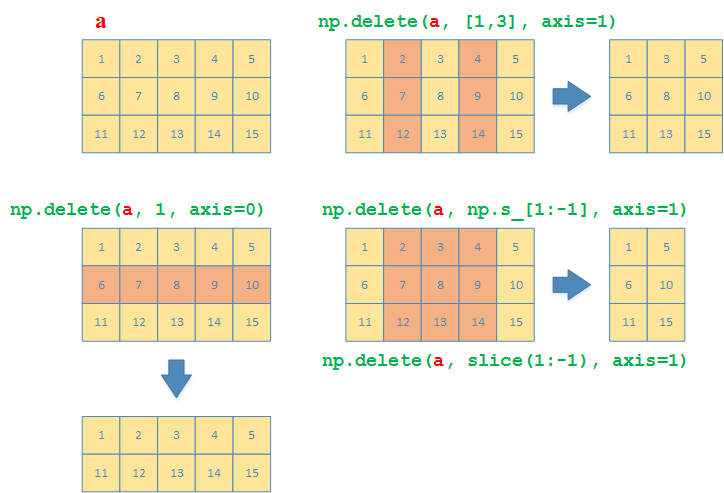
np.delete用来指定要删除的行或列,也可以同时指定多个连续或者不连续的行和列。
>>> a = np.array([[1,2,3,4,5], [6,7,8,9,10], [11,12,13,14,15]])
# 删除索引为1的行
>>> np.delete(a, 1, axis=0)
array([[ 1,  2,  3,  4,  5],
       [11, 12, 13, 14, 15]])
# 删除索引为1和3的列
>>> np.delete(a, [1,3], axis=1)
array([[ 1,  3,  5],
       [ 6,  8, 10],
       [11, 13, 15]])
# 删除第一(含)到倒数第一(不含)的列
>>> np.delete(a, np.s_[1:-1], axis=1)
array([[ 1,  5],
       [ 6, 10],
       [11, 15]])
# 删除第一(含)到倒数第一(不含)的列
>>> np.delete(a, slice(1,-1), axis=1)
array([[ 1,  5],
       [ 6, 10],
       [11, 15]])
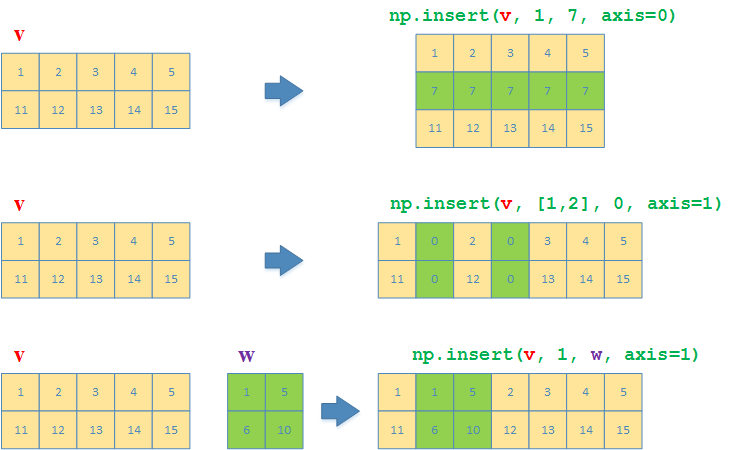
与np.delete对应的,np.insert用来指定要插入的行或列,也可以同时指定多个连续或者不连续的行和列
>>> v = np.array([[1,2,3,4,5], [6,7,8,9,10]])
# 沿着y方向(列),在第一行前面插入一行,元素都是7
>>> np.insert(v, 1, 7, axis=0)
array([[ 1,  2,  3,  4,  5],
       [ 7,  7,  7,  7,  7],
       [ 6,  7,  8,  9, 10]])
# 沿着x方向(行),在第一、二列前面分别各插入一列,元素都是0
>>> np.insert(v, [1, 2], 0, axis=1)
array([[ 1,  0,  2,  0,  3,  4,  5],
       [ 6,  0,  7,  0,  8,  9, 10]])
>>> w = np.array([[1,5], [6,10]])
# 沿着x方向(行),在第一列前面将矩阵w插入
>>> np.insert(v, [1], w, axis=1)
array([[ 1,  1,  5,  2,  3,  4,  5],
       [ 6,  6, 10,  7,  8,  9, 10]])
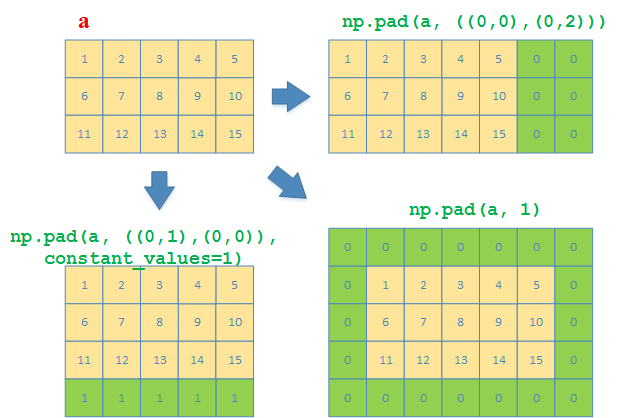
函数pad
在2D arrays(其实不止2D)中,np.pad可以用来给2D array(矩阵)的四周边界添加值
典型的用法比如
np.pad(arr, ((M, N), (S, T)), constant_values=1)
这里的边界参数含义如下
M:在该二维数组的第0行前面添加M行
N:在该二维数组的最后一行前面添加N行
S:在该二维数组的第0列前面添加S列
T:在该二维数组的最后一列前面添加T列
例子:
a = np.array([[1,2,3,4,5], [6,7,8,9,10], [11,12,13,14,15]])
# 在最后一行后面再添加一行
>>> np.pad(a, ((0,1),(0,0)), constant_values=1)
array([[ 1,  2,  3,  4,  5],
       [ 6,  7,  8,  9, 10],
       [11, 12, 13, 14, 15],
       [ 1,  1,  1,  1,  1]])
# 在最后一列后面再添加两列
>>> np.pad(a, ((0,0),(0,2)))
array([[ 1,  2,  3,  4,  5,  0,  0],
       [ 6,  7,  8,  9, 10,  0,  0],
       [11, 12, 13, 14, 15,  0,  0]])
# 在四周个添加一行/列
>>> np.pad(a, 1)
array([[ 0,  0,  0,  0,  0,  0,  0],
       [ 0,  1,  2,  3,  4,  5,  0],
       [ 0,  6,  7,  8,  9, 10,  0],
       [ 0, 11, 12, 13, 14, 15,  0],
       [ 0,  0,  0,  0,  0,  0,  0]])
10. Meshgrids
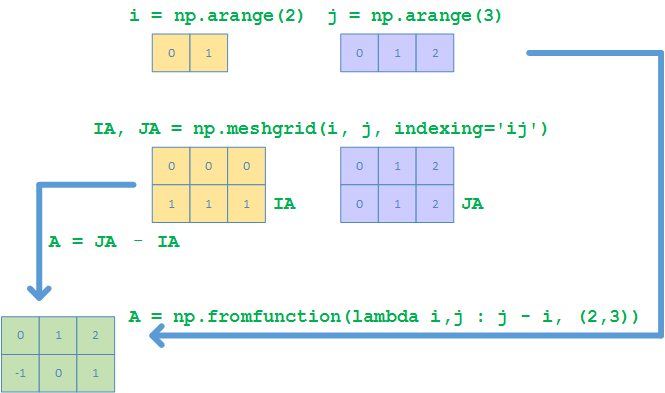
假设要产生一个如下的meshgrid
产生meshgrids的办法,可以有以下4种(这里假定产生的矩阵大小是3x2)
The C way
>>> A = np.empty((2,3))
>>> for i in range(2):
	  for j in range(3):
		A[i,j] = j - i
>>> A
array([[ 0.,  1.,  2.],
       [-1.,  0.,  1.]])
The Python way
>>> c = [[(j-i) for j in range(3)] for i in range(2)]
>>> A = np.array(c)
>>> A
array([[ 0,  1,  2],
       [-1,  0,  1]])
The Matlab way
>>> i, j = np.arange(2), np.arange(3)
>>> ia, ja = np.meshgrid(i, j, indexing='ij')
>>> ia, ja
(array([[0, 0, 0],
       [1, 1, 1]]),
 array([[0, 1, 2],
       [0, 1, 2]]))
>>> A = ja - ia
>>> A
array([[ 0,  1,  2],
       [-1,  0,  1]])
# 或者
>>> A = np.fromfunction(lambda i,j : j - i, (2,3))
>>> A
array([[ 0.,  1.,  2.],
       [-1.,  0.,  1.]])
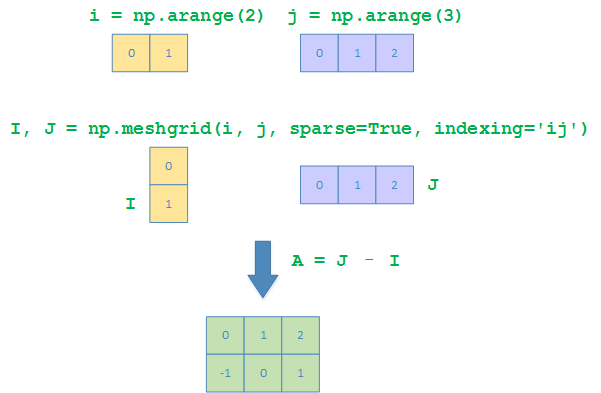
The Numpy way
>>> i, j = np.arange(2), np.arange(3)
>>> IA, JA = np.meshgrid(i, j, sparse=True, indexing='ij')
>>> IA
array([[0],
       [1]])
>>> JA
array([[0, 1, 2]])
>>> A = JA - IA
>>> A
array([[ 0,  1,  2],
       [-1,  0,  1]])
11. Matrix Statistics
常见统计函数
| 函数 | 作用 |
|---|---|
np.min |
最小值 |
np.max |
最大值 |
np.argmin |
最小值索引 |
np.argmax |
最大值索引 |
np.any |
至少有一个非0 |
np.all |
全部非0 |
np.sum |
求和 |
np.std |
标准差 |
np.var |
方差 |
np.mean |
平均值/期望 |
np.median |
平均值/期望 |
np.percentile |
百分比值 |
各个函数都可以不加
axis参数来计算所有的元素的统计值可以加
axis=0来计算沿列方向的统计值可以加
axis=1来计算沿行方向的统计值
np.min
>>> a = np.array([[4,8,5], [9,3,1]])
>>> np.min(a)
1
>>> np.min(a, axis=0)
array([4, 3, 1])
>>> np.min(a, axis=1)
array([4, 1])
np.max
>>> a = np.array([[4,8,5], [9,3,1]])
>>> np.max(a)
9
>>> np.max(a, axis=0)
array([9, 8, 5])
>>> np.max(a, axis=1)
array([8, 9])
np.argmin
>>> a = np.array([[4,8,5], [9,3,1]])
>>> np.argmin(a)
5
# 可以使用unravel_index来获取转换为二维的索引
>>> np.unravel_index(np.argmin(a), a.shape)
(1, 2)
>>> np.argmin(a, axis=0)
array([0, 1, 1], dtype=int64)
>>> np.argmin(a, axis=1)
array([0, 2], dtype=int64)
np.argmax
>>> a = np.array([[4,8,5], [9,3,1]])
>>> np.argmax(a)
3
# 可以使用unravel_index来获取转换为二维的索引
>>> np.unravel_index(np.argmax(a), a.shape)
(1, 0)
>>> np.argmax(a, axis=0)
array([1, 0, 0], dtype=int64)
>>> np.argmax(a, axis=1)
array([1, 0], dtype=int64)
np.any
>>> a = np.array([[4,8,5], [9,3,1]])
>>> np.any(a)
True
>>> np.any(a, axis=0)
array([ True,  True,  True])
>>> np.any(a, axis=1)
array([ True,  True])
np.all
>>> a = np.array([[4,8,5], [9,3,1]])
>>> np.all(a)
True
>>> np.all(a, axis=0)
array([ True,  True,  True])
>>> np.all(a, axis=1)
array([ True,  True])
np.sum
>>> a = np.array([[4,8,5], [9,3,1]])
>>> np.sum(a)
30
>>> np.sum(a, axis=0)
array([13, 11,  6])
>>> np.sum(a, axis=1)
array([17, 13])
np.std
>>> a = np.array([[4,8,5], [9,3,1]])
>>> np.std(a)
2.7688746209726918
>>> np.std(a, axis=0)
array([2.5, 2.5, 2. ])
>>> np.std(a, axis=1)
array([1.69967317, 3.39934634])
np.var
>>> a = np.array([[4,8,5], [9,3,1]])
>>> np.var(a)
7.666666666666667
>>> np.var(a, axis=0)
array([6.25, 6.25, 4.  ])
>>> np.var(a, axis=1)
array([ 2.88888889, 11.55555556])
np.mean, np.median
>>> a = np.array([[4,8,5], [9,3,1]])
>>> np.mean(a)
5.0
>>> np.mean(a, axis=0)
array([6.5, 5.5, 3. ])
>>> np.mean(a, axis=1)
array([5.66666667, 4.33333333])
>>> np.median(a)
4.5
>>> np.median(a, axis=0)
array([6.5, 5.5, 3. ])
>>> np.median(a, axis=1)
array([5., 3.])
np.percentile
>>> a = np.array([[4,8,5], [9,3,1]])
>>> np.percentile(a, 65)
5.75
>>> np.percentile(a, 65, axis=0)
array([7.25, 6.25, 3.6 ])
>>> np.percentile(a, 65, axis=1)
array([5.9, 4.8])
12. Matrix Sorting
主要的函数
| 函数 | 作用 | 备注 |
|---|---|---|
np.argsort |
按照某列(行)排序,返回索引 | |
ndarray.argsort |
按照某列(行)排序,返回索引 | 调用对象是ndarray |
np.lexsort |
总是按列进行排序 | |
np.flipud |
对2D array按行上下翻转(up/down) | |
np.fliplr |
对2D array按列左右翻转(left/right) |
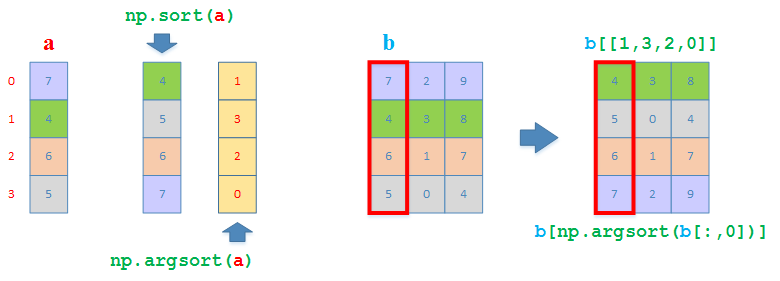
np.argsort
按照指定的列(行)排序,返回索引数组
实际上一个ndarray的object上也有argsort方法可以直接调用
排序一个1D array
>>> a = np.array([7, 4, 6, 5])
>>> a.argsort()
array([1, 3, 2, 0], dtype=int64)
>>> np.argsort(a)
array([1, 3, 2, 0], dtype=int64)
按照第一列排序整个2D array
>>> b = np.array([[7,2,9], [4,3,8], [6,1,7], [5,0,4]])
>>> b[np.argsort(b[:,0])]
array([[4, 3, 8],
       [5, 0, 4],
       [6, 1, 7],
       [7, 2, 9]])
# 也可以直接在新的ndarray上调用argsort,然后借用索引数组取得排序后的2D array
>>> b[b[:,0].argsort()]
array([[4, 3, 8],
       [5, 0, 4],
       [6, 1, 7],
       [7, 2, 9]])
# 效果相当于按索引返回新2D array
>>> b[[1,3,2,0]]
array([[4, 3, 8],
       [5, 0, 4],
       [6, 1, 7],
       [7, 2, 9]])
np.flipud, np.fliplr
np.flipud:用来将2D array上下翻转np.fliplr:用来将2D array左右翻转
>>> a = np.array([[3, 4, 5, 6], [2, 7, 0, -1], [1, 5, 3, 18], [2, 6, 1989, 3]])
>>> a
array([[   3,    4,    5,    6],
       [   2,    7,    0,   -1],
       [   1,    5,    3,   18],
       [   2,    6, 1989,    3]])
>>> np.flipud(a)
array([[   2,    6, 1989,    3],
       [   1,    5,    3,   18],
       [   2,    7,    0,   -1],
       [   3,    4,    5,    6]])
>>> np.fliplr(a)
array([[   6,    5,    4,    3],
       [  -1,    0,    7,    2],
       [  18,    3,    5,    1],
       [   3, 1989,    6,    2]])
np.lexsort
np.lexsort总是把每列当做一个整体进行排序(从下到上),返回的索引数组是列的索引
>>> a = np.array([[3, 4, 5, 6], [2, 7, 0, -1], [1, 5, 3, 18], [2, 6, 1989, 3]])
>>> a
array([[   3,    4,    5,    6],
       [   2,    7,    0,   -1],
       [   1,    5,    3,   18],
       [   2,    6, 1989,    3]])
# 返回列的索引
>>> idx = np.lexsort(a)
>>> idx
array([0, 3, 1, 2], dtype=int64)
# 按照列的索引数组取得新数组,得到排序后的结果
>>> a[:,idx]
array([[   3,    6,    4,    5],
       [   2,   -1,    7,    0],
       [   1,   18,    5,    3],
       [   2,    3,    6, 1989]])   # <--- 按照2 < 3 < 6 < 1989得到的排序顺序
pandas中有更加易读的sort_values函数可以按照行/列排序
>>> a = np.array([[3, 4, 5, 6], [2, 7, 0, -1], [1, 5, 3, 18], [2, 6, 1989, 3]])
>>> a
array([[   3,    4,    5,    6],
       [   2,    7,    0,   -1],
       [   1,    5,    3,   18],
       [   2,    6, 1989,    3]])
# 先按照第0列,再按照第2列进行排序,这里axis参数默认为0(按列)
>>> pd.DataFrame(a).sort_values(by=[0,2]).to_numpy()
array([[   1,    5,    3,   18],
       [   2,    7,    0,   -1],
       [   2,    6, 1989,    3],
       [   3,    4,    5,    6]])
# 先按照第0列,再按照第2列进行排序,这里显示指定axis参数为0(按列)
>>> pd.DataFrame(a).sort_values(by=[0, 2], axis=0).to_numpy()
array([[   1,    5,    3,   18],
       [   2,    7,    0,   -1],
       [   2,    6, 1989,    3],
       [   3,    4,    5,    6]])
# 先按照第1行,再按照第3行进行排序,这里显示指定axis参数为1(按行)
>>> pd.DataFrame(a).sort_values(by=[1, 3], axis=1).to_numpy()
array([[   6,    5,    3,    4],
       [  -1,    0,    2,    7],
       [  18,    3,    1,    5],
       [   3, 1989,    2,    6]])
13. 3D and Above Matrix
用到的函数
| 函数 | 作用 |
|---|---|
np.concatenate |
沿axis=0|1|2的方向连接 |
np.moveaxis |
参数为(a, srcAxis, destAxis) |
np.swapaxes |
|
np.einsum |
Numpy中3D array的维度顺序
在Numpy中,3D array的维度顺序是(z, y, x),即和正常的(x, y, z)是相反的逆序。
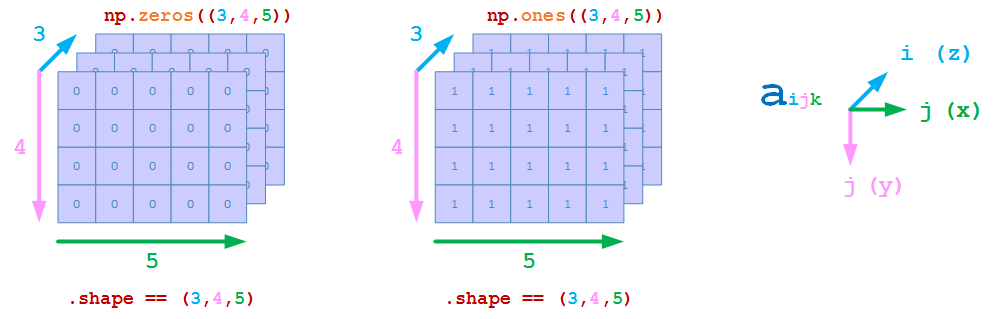
例如,创建z方向为3,y方向为4,x方向为5的3D array
>>> np.zeros((3,4,5))
array([[[0., 0., 0., 0., 0.],
        [0., 0., 0., 0., 0.],
        [0., 0., 0., 0., 0.],
        [0., 0., 0., 0., 0.]],

       [[0., 0., 0., 0., 0.],
        [0., 0., 0., 0., 0.],
        [0., 0., 0., 0., 0.],
        [0., 0., 0., 0., 0.]],

       [[0., 0., 0., 0., 0.],
        [0., 0., 0., 0., 0.],
        [0., 0., 0., 0., 0.],
        [0., 0., 0., 0., 0.]]])
>>> np.ones((3,4,5))
array([[[1., 1., 1., 1., 1.],
        [1., 1., 1., 1., 1.],
        [1., 1., 1., 1., 1.],
        [1., 1., 1., 1., 1.]],

       [[1., 1., 1., 1., 1.],
        [1., 1., 1., 1., 1.],
        [1., 1., 1., 1., 1.],
        [1., 1., 1., 1., 1.]],

       [[1., 1., 1., 1., 1.],
        [1., 1., 1., 1., 1.],
        [1., 1., 1., 1., 1.],
        [1., 1., 1., 1., 1.]]])
# 注意,np.random.ran函数的参数不是一个元组
>>> np.random.rand(3,4,5)
array([[[0.06299431, 0.09575032, 0.2670843 , 0.51132979, 0.29522357],
        [0.99386711, 0.18979029, 0.88268506, 0.8844051 , 0.3979463 ],
        [0.52145756, 0.2953166 , 0.98018492, 0.15031576, 0.35522931],
        [0.01009925, 0.93094333, 0.23642368, 0.00796226, 0.2548972 ]],

       [[0.92253603, 0.5261462 , 0.07146182, 0.06805223, 0.67127133],
        [0.14054481, 0.27912101, 0.12922132, 0.08241845, 0.78589279],
        [0.90330273, 0.32816306, 0.41328599, 0.18650637, 0.58881924],
        [0.39545397, 0.47953933, 0.25072117, 0.2345669 , 0.14524772]],

       [[0.28491979, 0.55260934, 0.19610983, 0.86477694, 0.35238863],
        [0.85913433, 0.56783708, 0.76408683, 0.11193118, 0.36949155],
        [0.36358321, 0.51957791, 0.34842336, 0.79710159, 0.58843289],
        [0.74677968, 0.44109851, 0.35527215, 0.733685  , 0.40455108]]])
np.concatenate
使用np.concatenate连接3D array的示意如下
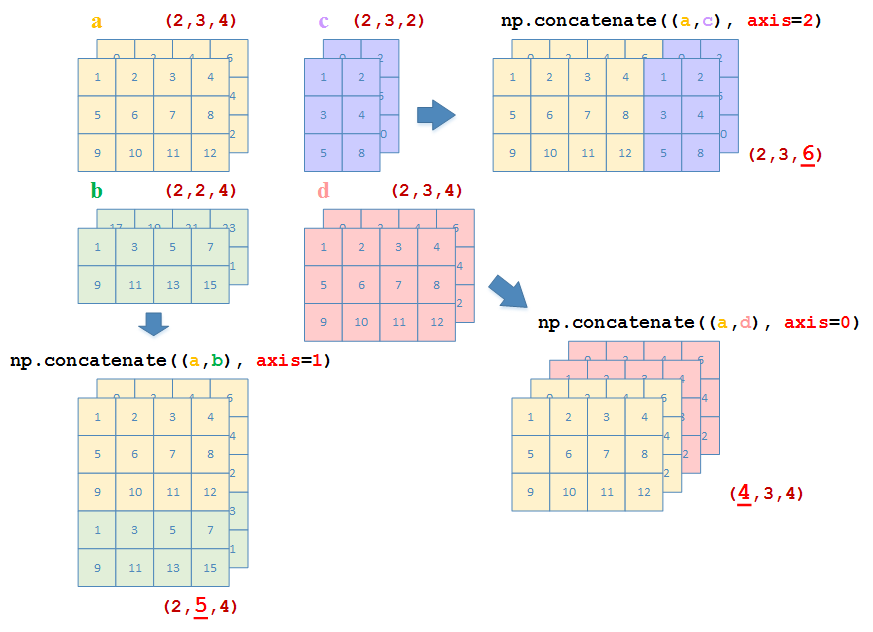
定义以下3个3D array,其中
a:a.shape = (2, 3, 4)b:b.shape = (2, 2, 4)c:c.shape = (2, 3, 2)d:d.shape = (2, 3, 4)
>>> a = np.array([ [[1,2,3,4], [5,6,7,8], [9,10,11,12]], [[0,2,4,6], [8,10,12,14], [16,18,20,22]] ])
>>> a
array([[[ 1,  2,  3,  4],
        [ 5,  6,  7,  8],
        [ 9, 10, 11, 12]],

       [[ 0,  2,  4,  6],
        [ 8, 10, 12, 14],
        [16, 18, 20, 22]]])
>>> b = np.array([ [[1,3,5,7], [9,11,13,15]], [[17,19,21,23], [25,27,29,31]] ])
>>> b
array([[[ 1,  3,  5,  7],
        [ 9, 11, 13, 15]],

       [[17, 19, 21, 23],
        [25, 27, 29, 31]]])
>>> c = np.array([ [[1,2], [3,4], [5,8]], [[0,2],[4,6],[8,10]] ])
>>> d = a - 10
>>> d
array([[[ -9,  -8,  -7,  -6],
        [ -5,  -4,  -3,  -2],
        [ -1,   0,   1,   2]],

       [[-10,  -8,  -6,  -4],
        [ -2,   0,   2,   4],
        [  6,   8,  10,  12]]])
>>> a.shape
(2, 3, 4)
>>> b.shape
(2, 2, 4)
>>> c.shape
(2, 3, 2)
>>> d.shape
(2, 3, 4)
沿z方向连接(axis = 0)
>>> np.concatenate((a,d), axis=0)
array([[[  1,   2,   3,   4],
        [  5,   6,   7,   8],
        [  9,  10,  11,  12]],

       [[  0,   2,   4,   6],
        [  8,  10,  12,  14],
        [ 16,  18,  20,  22]],

       [[ -9,  -8,  -7,  -6],
        [ -5,  -4,  -3,  -2],
        [ -1,   0,   1,   2]],

       [[-10,  -8,  -6,  -4],
        [ -2,   0,   2,   4],
        [  6,   8,  10,  12]]])
沿y方向连接(axis = 1)
>>> np.concatenate((a,b), axis=1)
array([[[ 1,  2,  3,  4],
        [ 5,  6,  7,  8],
        [ 9, 10, 11, 12],
        [ 1,  3,  5,  7],
        [ 9, 11, 13, 15]],

       [[ 0,  2,  4,  6],
        [ 8, 10, 12, 14],
        [16, 18, 20, 22],
        [17, 19, 21, 23],
        [25, 27, 29, 31]]])
沿x方向连接(axis = 2)
>>> np.concatenate((a,c), axis=2)
array([[[ 1,  2,  3,  4,  1,  2],
        [ 5,  6,  7,  8,  3,  4],
        [ 9, 10, 11, 12,  5,  8]],

       [[ 0,  2,  4,  6,  0,  2],
        [ 8, 10, 12, 14,  4,  6],
        [16, 18, 20, 22,  8, 10]]])
np.hstack,np.vstack,np.dstack
值得注意的是,np.hstack,np.vstack,np.dstack将输入的3D array参数的三个维度分别当做(y, x, z),而并非通常意义上的(z, y, x)